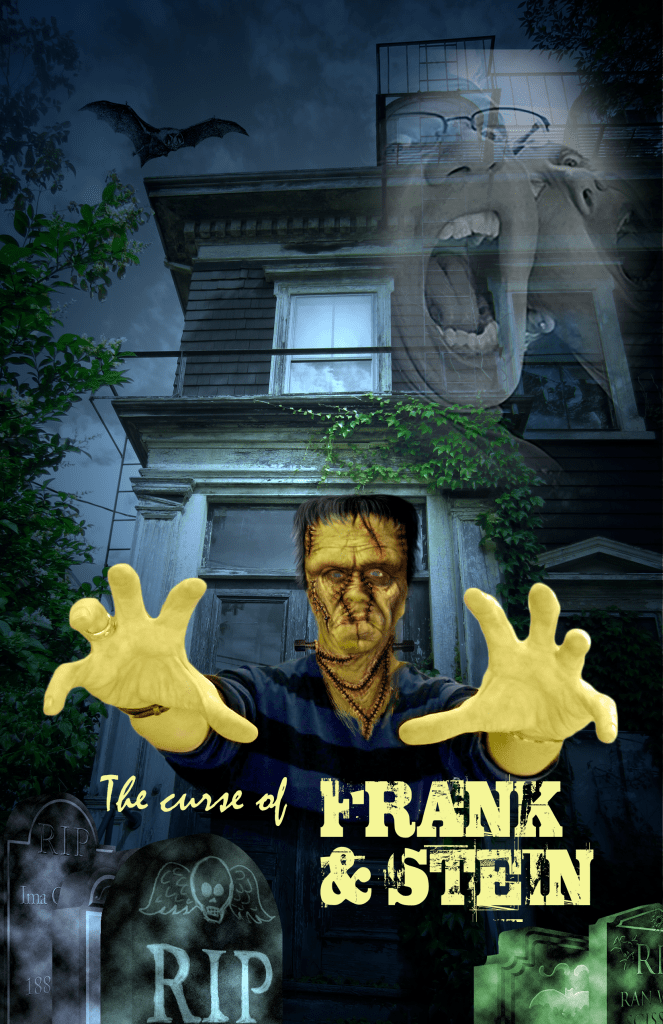
Of all the different work I did in Photoshop throughout the course, this was by far the most interesting and complex image I produced. It combined various techniques and tools that were all integral to the end result. Frankenstein’s face was a byproduct of rearranging layers, applying smart filters, editing layers onto one another, and applying color effects. I then dragged the edited Frankenstein image onto the background image. Additionally, I applied filters and digital color effects to the tombstones in order to give the poster an eery feeling. Perhaps the most intriguing part of this poster is the faded image in the top right corner. I drew an elliptical marquee, copy and pasted the image into it, and then blended the image into the poster. Overall, I enjoyed making the Frankenstein poster with Photoshop because of its complexity and advanced nature.
Frankenstein Advanced Compositing
Leave a reply




 Dante Parente's New Media Production Portfolio